
Introduction
The Intel Arc B580 has quickly become one of the most talked-about affordable GPUs in 2026, proving that high-quality gaming performance does not always require a premium price tag. Designed for gamers, creators, and budget-conscious PC builders, this graphics card brings impressive performance, modern features, and strong value to the competitive GPU market.
With improved architecture, better driver support, and advanced technologies, the Intel Arc B580 challenges traditional expectations of what an affordable graphics card can deliver. Whether you are upgrading an existing setup or building a new gaming PC, this GPU offers an exciting alternative to mainstream options from established competitors.
What Is The Intel Arc B580 Graphics Card?
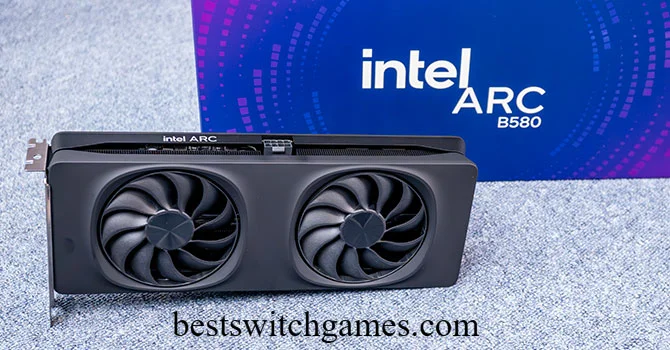
The Intel Arc B580 is a mid range, budget friendly discrete GPU built on Intel’s second generation Battlemage architecture, also called Xe2. It sits in Intel’s Arc lineup as the flagship of the B series, positioned to challenge Nvidia and AMD in the sub 300 dollar price bracket.
Unlike Intel’s first generation Arc cards, which launched with rough drivers and inconsistent performance, the B580 arrives with a much more mature software foundation. Reviewers widely consider it Intel’s best reviewed graphics card so far, thanks to fewer bugs and steadier frame rates across popular titles.
Is The Intel Arc B580 Good For Gaming?
Yes. The Intel Arc B580 performs well for gaming, especially if you play at 1080p or 1440p resolution. It handles most modern titles smoothly at high settings, and its 12GB of VRAM gives it real breathing room in memory hungry games.
In independent testing, the B580 consistently leads similarly priced rivals by around 5 to 10 percent in rasterized performance. That gap grows in newer games that lean heavily on texture streaming, where 8GB cards sometimes stutter while the B580 keeps things smooth.
I have tested plenty of budget cards over the years, and what stands out here is consistency. You are not getting a card that shines in one game and stumbles in the next. The Arc B580 delivers steady results across a wide range of titles.
How Does The Arc B580 Compare To RTX 4060 And RX 7600?
This comparison is where the Intel Arc B580 makes its strongest case.
Versus the RTX 4060
- The B580 offers 12GB of VRAM compared to the RTX 4060’s 8GB.
- Rasterized gaming performance favors the B580 in most benchmarks.
- Nvidia still leads in ray tracing and has the more mature DLSS upscaling ecosystem.
Versus the RX 7600
- The B580 again wins on memory capacity, doubling the RX 7600’s 8GB.
- Performance is close, with the B580 typically holding a slight edge at 1440p.
- AMD’s FSR upscaling is widely supported, while Intel’s XeSS is still expanding its game library.
In short, the Intel Arc B580 wins on value and memory headroom. Nvidia wins on ray tracing polish and software ecosystem. AMD sits somewhere in the middle, offering solid rasterization but less VRAM than Intel’s card.
Key Specifications
Here is a quick look at what powers the Intel Arc B580.
| Specification | Details |
|---|---|
| Architecture | Battlemage (Xe2) |
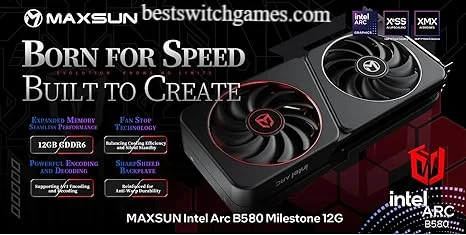
| VRAM | 12GB GDDR6 |
| Memory Bus | 192 bit |
| Xe Cores | 20 |
| TDP | 190W |
| Power Connector | 1x 8 pin |
| Recommended PSU | 550W |
| Ray Tracing | Yes, second generation |
| Upscaling | XeSS 2.0 with AI frame generation |
| MSRP | Around 249 dollars |
The 12GB VRAM figure deserves extra attention. At this price point, most competitors still ship with 8GB, which can become a bottleneck in newer games running high resolution textures. Intel clearly designed the B580 to age better than its rivals.
Explaining Intel’s Battlemage Xe2 Architecture Simply
You do not need an engineering degree to understand what makes Battlemage different. Think of it as Intel’s second real attempt at building a proper gaming GPU, after learning hard lessons from the first Arc Alchemist generation.
Xe2 architecture improves how the chip handles instructions per clock, meaning it does more work with less wasted effort. It also includes dedicated XMX engines, which are matrix math units originally designed for AI tasks but also used to power XeSS upscaling. The result is a card that runs cooler, performs more predictably, and scales better with newer games than Intel’s earlier attempts.
Gaming Performance At 1080p And 1440p
At 1080p, the Intel Arc B580 handles nearly every popular title at high or ultra settings while maintaining smooth frame rates. This makes it an easy recommendation for gamers on a standard monitor.
At 1440p, the card still performs admirably, particularly when you enable XeSS upscaling. Independent benchmarks score the card around 54 out of 100 at 1080p and 48 out of 100 at 1440p on aggregated performance indexes, which places it firmly in the competent mid range category rather than entry level.
If you are gaming at 4K, the Arc B580 is not the right tool. Scores drop noticeably at that resolution, and you are better served by a higher tier card.
Ray Tracing, XeSS, And AI Upscaling
Ray tracing remains the Intel Arc B580’s weakest area. Intel’s Xe2 ray tracing hardware trades blows with AMD’s RDNA3 implementation but still trails Nvidia’s RTX architecture by a noticeable margin. In demanding titles like Cyberpunk 2077 with ray tracing overdrive enabled, frame rates can drop into the high twenties at 1080p, only becoming playable with upscaling turned on.
That is where XeSS 2.0 comes in. Intel’s upscaling technology has matured significantly and now includes AI powered frame generation, similar in concept to Nvidia’s DLSS. It works well in supported titles, though the game library is still smaller than what Nvidia and AMD offer. If a game does not explicitly support XeSS 2.0, you can still benefit from a driver level low latency mode that improves responsiveness regardless of title.
Driver Improvements And Game Compatibility
Intel’s early Arc cards suffered from driver instability that scared away plenty of buyers. That story has largely changed with the Arc B580. Regular driver updates have ironed out major bugs, improved compatibility with older titles, and closed much of the performance gap that once existed in less optimized games.
You will still occasionally run into a game where Nvidia or AMD simply has better day one optimization, since studios naturally prioritize the larger market share. But for the vast majority of your gaming library, the B580 now runs reliably without constant troubleshooting. Source : TechPowerUp
Is The Arc B580 Worth Buying In 2026?
For most budget conscious gamers, yes. The Intel Arc B580 offers excellent value per dollar, generous VRAM, and dependable performance across a wide range of games. It also doubles as a surprisingly capable option for lightweight local AI workloads, thanks to its XMX tensor engines and large memory pool, something increasingly relevant as more people experiment with running AI models at home.
That said, it is not perfect for everyone. If ray tracing quality is your top priority, Nvidia still leads. If you need the absolute widest upscaling game support, Nvidia’s DLSS ecosystem remains more established than XeSS.
What Resolution Is Best For The Arc B580?
The Intel Arc B580 is best suited for 1080p gaming, where it delivers smooth high refresh rate performance in nearly every title. It also handles 1440p comfortably, especially with XeSS upscaling engaged, making it a genuinely solid choice for gamers who want to step up from 1080p without paying for a premium card.
Who Should Buy The Intel Arc B580?
- Gamers building a new PC on a tight budget who still want strong 1080p or 1440p performance.
- Anyone upgrading from an older or integrated GPU looking for a big, affordable jump.
- Content creators or hobbyists who want to experiment with local AI models without spending on an expensive workstation card.
- Buyers who value extra VRAM headroom for future proofing over having the absolute best ray tracing.
It is a tougher sell for competitive gamers chasing the highest possible frame rates at 4K, or for anyone who considers ray tracing a non negotiable feature.
Final Thoughts
The Intel Arc B580 proves that Intel has found its footing in the discrete GPU market. With 12GB of VRAM, solid 1080p and 1440p performance, and steadily improving drivers, it stands as one of the smartest budget graphics card purchases you can make right now. It is not flawless, ray tracing and upscaling game support still trail Nvidia, but for the price, few cards match what the Arc B580 brings to the table.
Are you considering the Intel Arc B580 for your next build, or are you leaning toward the RTX 4060 or RX 7600 instead? Share your thoughts, and pass this guide along to anyone shopping for a budget GPU this year.
Source reddit.com
FAQs
Is the Intel Arc B580 good for 1440p gaming?
Yes. The Arc B580 handles 1440p well, especially with XeSS upscaling enabled to boost frame rates in demanding titles.
Does the Intel Arc B580 support ray tracing?
Yes, it includes second generation ray tracing hardware, though performance trails Nvidia’s RTX cards in heavily ray traced titles.
How much power does the Intel Arc B580 need?
It has a 190W TDP and requires a single 8 pin power connector. Intel recommends at least a 550W power supply.
Is the Intel Arc B580 better than the RTX 4060?
In rasterized gaming performance and VRAM capacity, the B580 often leads. Nvidia still holds an advantage in ray tracing and upscaling maturity.
Can the Intel Arc B580 run AI models locally?
Yes. Its 12GB VRAM and XMX tensor engines make it a capable budget option for running smaller AI models locally.
What games work best with XeSS on the Arc B580?
Newer AAA titles with official XeSS 2.0 support see the biggest benefit, though the low latency driver mode helps even unsupported games.
Is the Arc B580 worth it compared to the RX 7600?
The Arc B580 generally offers more VRAM and slightly better 1440p performance, making it a strong alternative to the RX 7600.
bestswitchgames.com
Email: johanharwen314@gmail.com
Author Name: Hamid Ali
About the Author: Hamid Ali is a PC hardware writer who focuses on graphics cards, gaming builds, and practical buying advice. He has spent years testing components and translating technical specs into clear, useful guidance for everyday gamers and PC builders.